charts
versus-incident
versus-incident - An open-source incident management system with multi-channel alerting capabilities.
helm repo add unifie https://unifie-cloud.github.io/charts/helm
Features
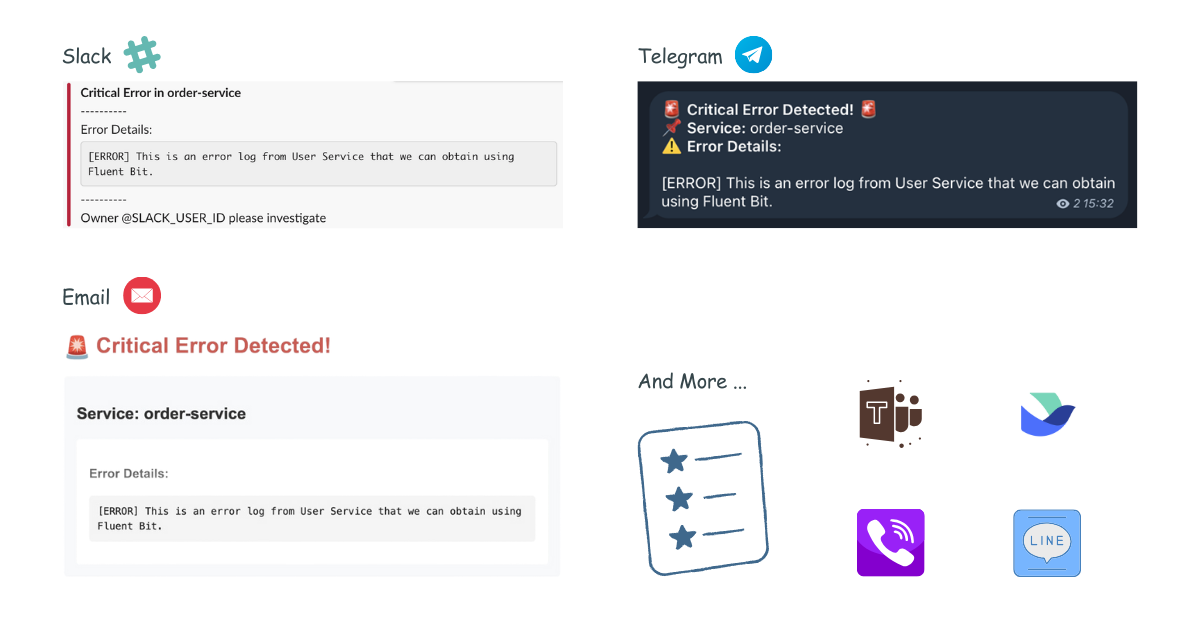
- 🚨 Multi-channel Alerts: Send incident notifications to Slack (more channels coming!)
- 📝 Custom Templates: Define your own alert messages using Go templates
- 🔧 Easy Configuration: YAML-based configuration with environment variables support
- 📡 REST API: Simple HTTP interface to receive alerts
Environment Variables
The application relies on several environment variables to configure alerting services. Below is an explanation of each variable:
Common
| Variable | Description |
|---|---|
DEBUG_BODY |
Set to true to enable print body send to Versus Incident. |
Slack Configuration
| Variable | Description |
|---|---|
SLACK_ENABLE |
Set to true to enable Slack notifications. |
SLACK_TOKEN |
The authentication token for your Slack bot. |
SLACK_CHANNEL_ID |
The ID of the Slack channel where alerts will be sent. |
Telegram Configuration
| Variable | Description |
|---|---|
TELEGRAM_ENABLE |
Set to true to enable Telegram notifications. |
TELEGRAM_BOT_TOKEN |
The authentication token for your Telegram bot. |
TELEGRAM_CHAT_ID |
The chat ID where alerts will be sent. |
Email Configuration
| Variable | Description |
|---|---|
EMAIL_ENABLE |
Set to true to enable email notifications. |
SMTP_HOST |
The SMTP server hostname (e.g., smtp.gmail.com). |
SMTP_PORT |
The SMTP server port (e.g., 587 for TLS). |
SMTP_USERNAME |
The username/email for SMTP authentication. |
SMTP_PASSWORD |
The password or app-specific password for SMTP authentication. |
EMAIL_TO |
The recipient email address for incident notifications. |
EMAIL_SUBJECT |
The subject line for email notifications. |
AWS SNS Configuration
| Variable | Description |
|---|---|
SNS_ENABLE |
Set to true to enable receive Alert Messages from SNS. |
SNS_HTTPS_ENDPOINT_SUBSCRIPTION |
This specifies the HTTPS endpoint to which SNS sends messages. When an HTTPS endpoint is configured, an SNS subscription is automatically created. If no endpoint is configured, you must create the SNS subscription manually using the CLI or AWS Console. E.g. https://your-domain.com |
SNS_TOPIC_ARN |
AWS ARN of the SNS topic to subscribe to |
Ensure these environment variables are properly set before running the application. You can configure them in your .env file, Docker environment variables, or Kubernetes secrets.
Custom Alert Templates
Slack Template
Create your Slack message template, for example config/slack_message.tmpl:
*Critical Error in *
----------
Error Details:

----------
Owner <@> please investigate
Telegram Template
For Telegram, you can use HTML formatting. Create your Telegram message template, for example config/telegram_message.tmpl:
🚨 <b>Critical Error Detected!</b> 🚨
📌 <b>Service:</b>
⚠️ <b>Error Details:</b>
This template will be parsed with HTML tags when sending the alert to Telegram.
Email Template
Create your email message template, for example config/email_message.tmpl:
Subject: Critical Error Alert -

Critical Error Detected in
----------------------------------------

Error Details:


Please investigate this issue immediately.

Best regards,
Versus Incident Management System
This template supports both plain text and HTML formatting for email notifications.
One click deploy
You can use unifie.cloud to deploy this project to your cluster:
